Master RealNex Navigator, one module at a time
RealNex Academy walks you through every part of the platform — from your first login to advanced deal workflows. Watch the videos, follow the step-by-step lessons, test yourself with knowledge checks, and track your progress as you go.
Start Learning →Choose your path by role
Investment Sales Broker
Prospect owners, run BOVs, market listings, close in secure deal rooms.
Leasing Agent
Manage availabilities, deliver space to prospects, track tours to signed lease.
Tenant Rep
Search inventory, build tour books, compare options, guide clients to signature.
Marketing & Analysts
Branded presentations, campaigns, syndication, and business intelligence.
Brokerage Leaders
Team visibility and forecasting, not guesswork.
Research Teams
Turn proprietary data into a defensible advantage.
Asset Managers
Proactive portfolio optimization, end to end.
The platform at a glance
RealNex Navigator integrates every essential CRE business function into one platform — eliminating data silos and manual re-entry. Four core tools work as one system, supported by marketing, deal room, and analytics modules:
KRM
Knowledge & Relationship Management — your market intelligence center
MarketEdge
Analysis & presentations that win listings
Bridge
Transaction management, tour to signed lease
MarketPlace
Publish once, syndicate everywhere, capture leads
🔐 Vault
Purpose-built CRE deal rooms with engagement analytics.
📊 Insights
Power BI dashboards on your live KRM data.
📱 Mobile App
Your full KRM in the field — capture, geocode, and close from anywhere.
🎥 Visuals
Aerial tours, 3D virtual tours, renderings, and property videos.
🤖 RealNex Intelligence
CRE-trained AI that reads your KRM to surface opportunities and sharpen strategy.
📣 Marketing Suite
RealCampaigns, RealBlast, and website listing tools.
RealNex by the numbers
Years in CRE.
U.S. properties in the database.
MarketPlace professional audience.
Tools, one login, one source of truth.
The knowledge flywheel
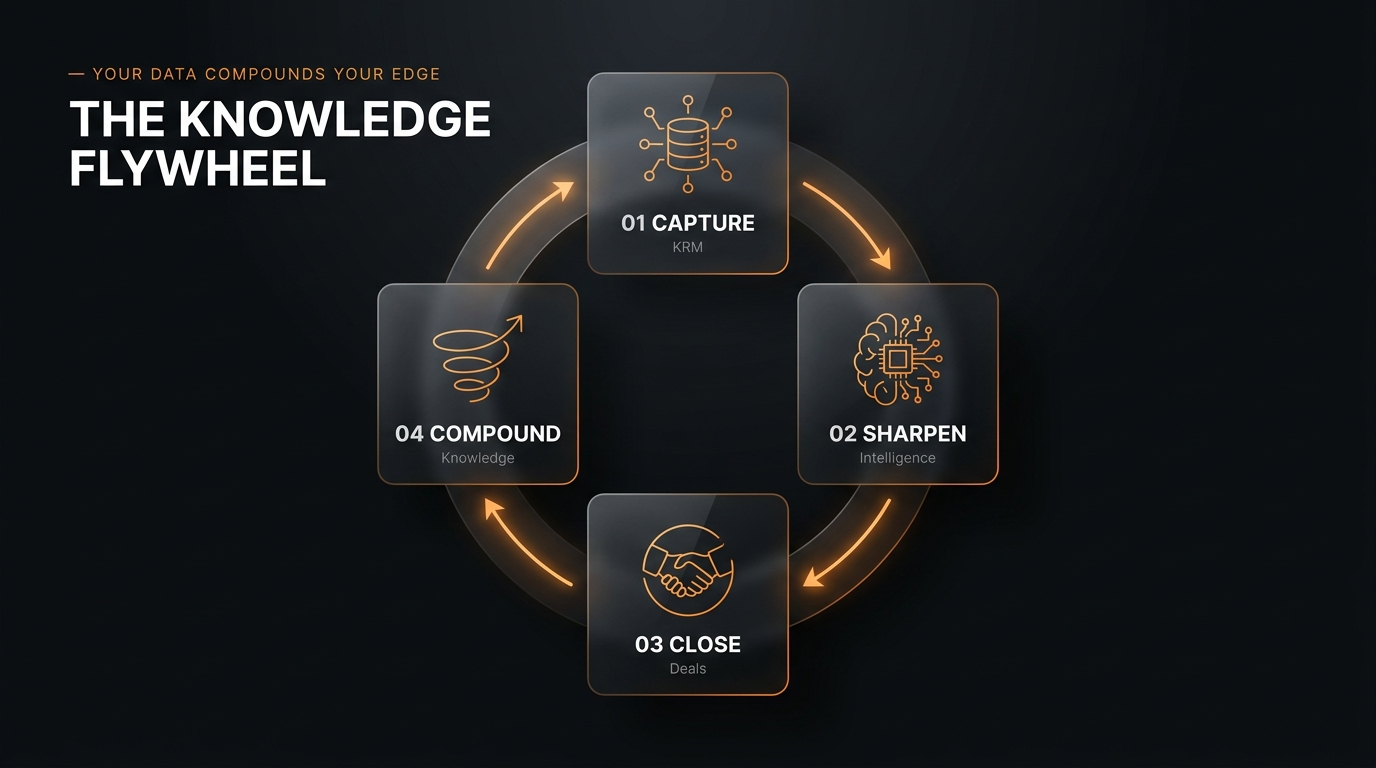
Knowledge, strategy, and activation feed one another in a loop — the longer you run on RealNex, the bigger your edge:
KRM captures
Every property, owner, prospect, and interaction, organized around the asset
Intelligence sharpens
CRE-trained AI turns data into valuation, targeting, and strategy
Deals close faster
Better-aimed effort moves deals from listing to signed
Knowledge compounds
Each close writes new knowledge back to KRM — the edge grows

"Every business needs tools and resources. What I love about RealNex is that the team there has thought through my entire deal flow process and created a solution for me to make my day that much easier. I would say it's the biggest 'no brainer' in commercial real estate." — Hayim Mizrachi, CCIM | President, Principal, MDL Group
Getting Started with RealNex
Set up your account the right way in your first week — so every other module builds on a solid foundation.
Watch: Navigator in action
Your first-week checklist
- Log in and explore Navigator. Get familiar with how KRM, MarketEdge, Bridge, and MarketPlace connect from the main workspace.
- Import your contacts and properties. KRM is property-centric — bring in your contacts, companies, and properties so records can link together.
- Set up your branding. Load your firm's logo and colors so every flyer, BOV, and OM produced in MarketEdge carries your brand.
- Install RealNex Mobile. Log calls, dictate notes, and access your full KRM from the field.
- Create your first property record. Link an owner, tenant, and comp to see the relational database in action.
- Publish a test listing to MarketPlace. See how one entry flows to your website, campaigns, and syndication.
- Install RealNex Mobile from the App Store (also on Google Play) — see the Mobile App module.
- Book a live training session or webinar. Schedule via the RealNex webinar series, or book a demo.
How the deal lifecycle maps to the platform
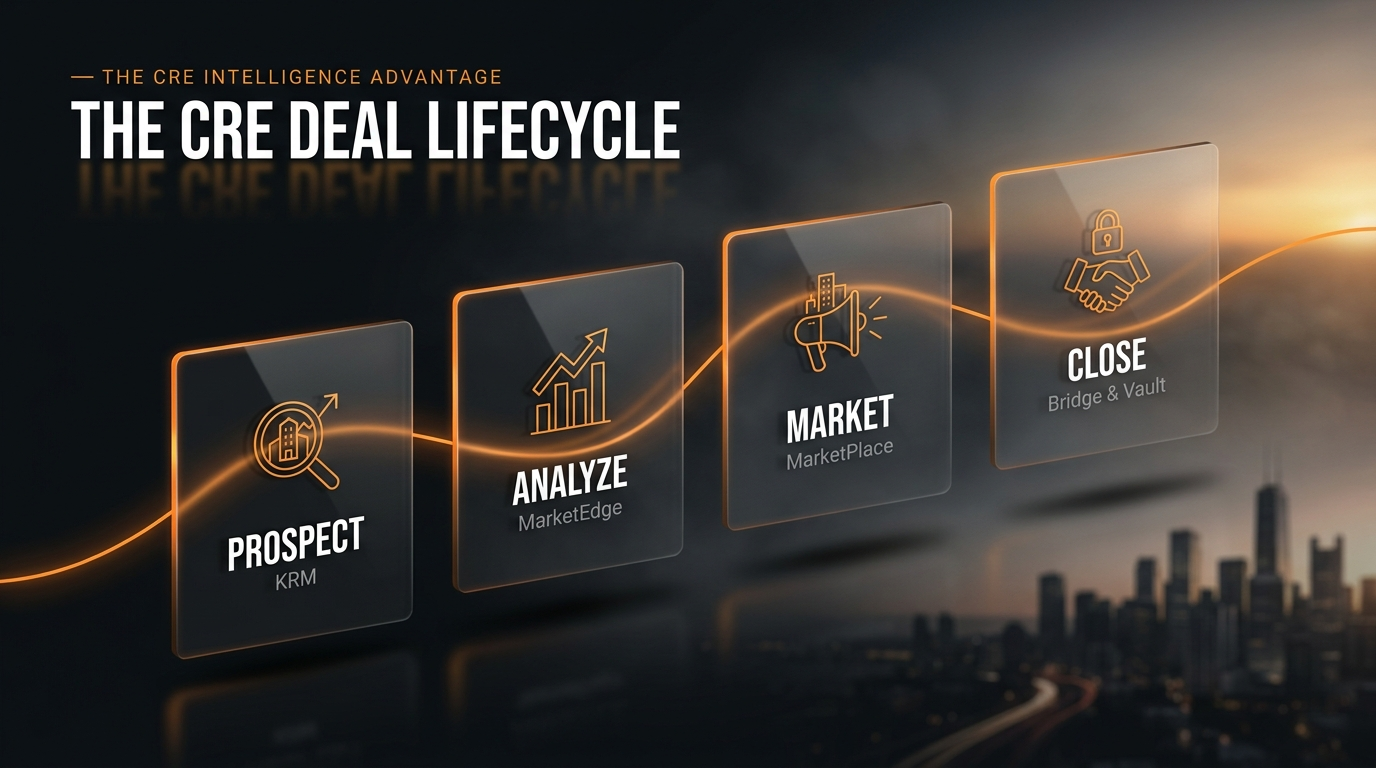
Everything in RealNex is organized around four deal stages. Learn these and you'll always know which tool to reach for:
Prospect
Identify, organize, and track opportunities in KRM
Analyze
Run investment and lease analyses in MarketEdge
Market
Presentations, campaigns, and syndication via MarketPlace
Close
Secure workflows and deal rooms in Bridge & Vault
Where to get help
📞 Phone
281-299-3161
info@realnex.com · sales@realnex.com
🎓 Demo & Training
realnex.com/demo · live webinars · bookable 1:1 training
KRM — Knowledge & Relationship Management
Generic CRMs manage contacts. RealNex KRM masters markets.
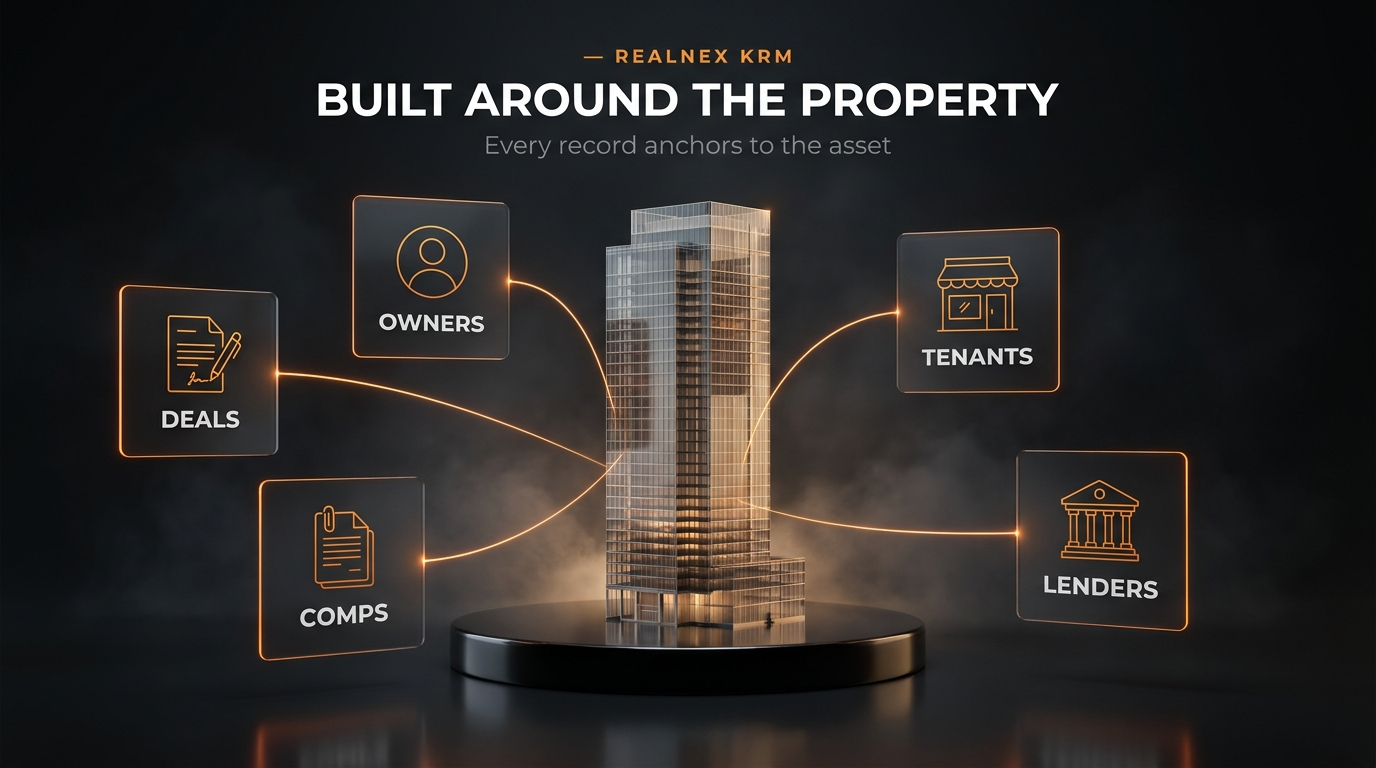
The big idea: property-centric, not contact-centric
KRM is built on a property-centric relational database. Every record anchors to the property — connecting owners, tenants, lenders, comps, and deals in one structure that mirrors how CRE actually works. Contacts link to the companies they run and the properties they occupy or own, so you see the full picture before you make the call. Every record you enter makes the system more valuable: institutional knowledge that no departure can take away.
Lessons
- Query your database by property type, market, or lease expiration to build target lists (e.g., every owner of Class A apartments in your submarket).
- Layer in RX Data signals — hold cycles, loan maturities, buying history — to prioritize the most likely sellers and buyers.
- Save your searches as working lists and attach follow-up tasks so no prospect goes cold.
- Open a property record to surface ownership history and transaction records instantly.
- Follow the relationship links: owner → their company → other properties they hold → tenants in place.
- Review the logged communication history — every call, email, and note is attached to the record, visible to everyone who needs it.
- Set automated reminders and task sequences to keep deals warm.
- Log activity as it happens — desktop or mobile. Dictate notes right after a call from the field.
- Use groups and lists to feed RealCampaigns for personalized outreach (covered in the Marketing module).
- Track every opportunity by stage, priority, and next action.
- Use intelligence dashboards for pipeline velocity, conversion trends, and market activity.
- When deals close, every comp and completed deal becomes a lasting, searchable asset.
Team features: one shared database with role-based permissions protects sensitive data while keeping brokerage, research, and marketing in lockstep — no siloed spreadsheets, no agents stepping on each other's clients.
"Using the RealNex CRM, I know what all of my clients own and what they'd like to buy… I can pull up every investor who buys Class A apartments. I can narrow my search by selecting 'student property,' and now I've got 50 buyers… It's irreplaceable." — Beau Beery, CCIM | Beau Beery Multifamily Advisors
Knowledge check
1. What is every KRM record anchored to?
2. Which of these is a KRM prospecting filter highlighted in training?
3. Why does KRM data "compound in value"?
MarketEdge — Analyze, Present, Win
Turn analysis, strategy, and market knowledge into polished presentations that close — no spreadsheet grind.
What MarketEdge does
Whether you're underwriting an acquisition or comparing lease alternatives for a tenant, MarketEdge pulls data straight from your KRM and turns it into financial analysis and branded presentations: flyers, BOVs, offering memorandums, and proposals — from a library of 250+ templates, all white-labeled with your firm's brand.
Plus equity multiple & cash-on-cash — investment returns calculated instantly.
Templates for flyers, BOVs, OMs, and proposals.
Visual comp sets you can adjust on the fly.
Rent rolls modeled lease-by-lease, expiration to renewal.
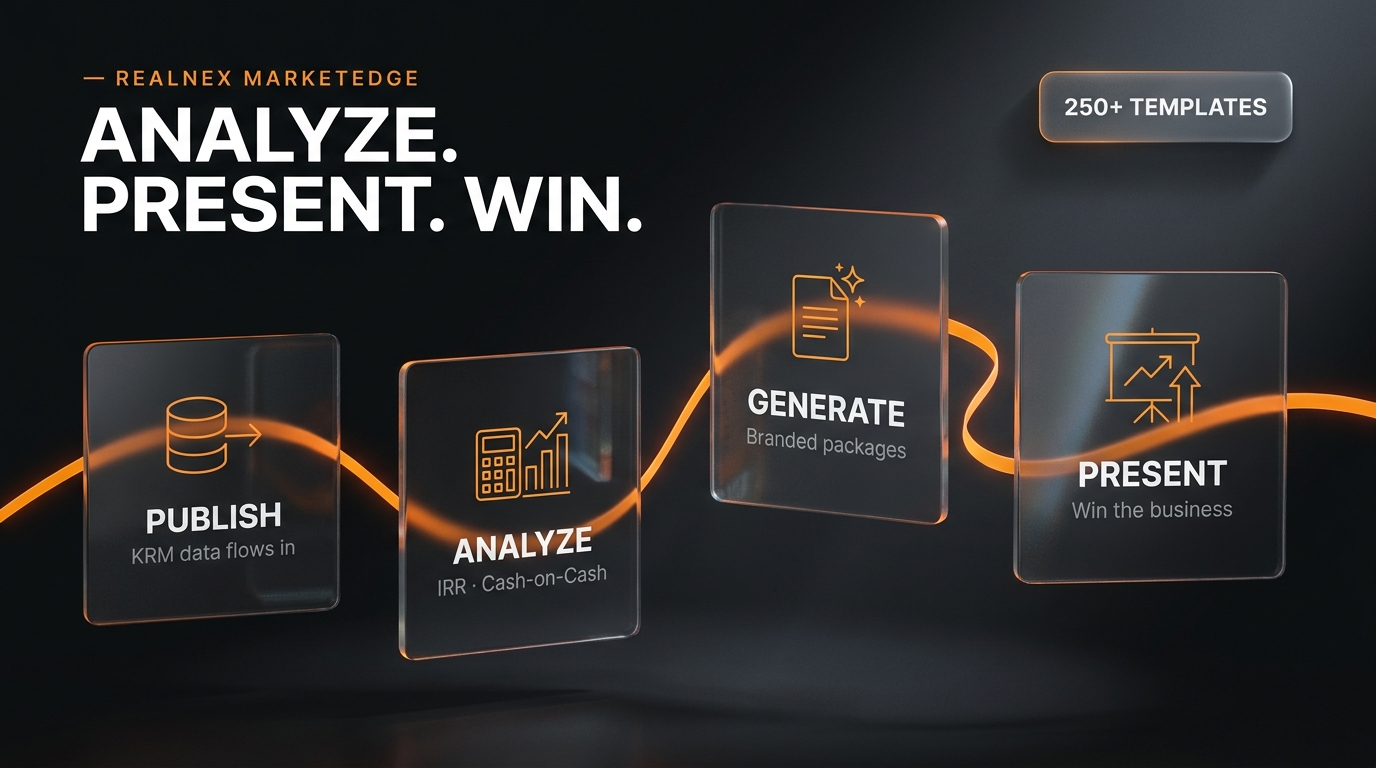
The workflow: Publish → Analyze → Generate → Present
Publish
KRM data feeds the analysis and presentation
Analyze
Choose valuation methods and key assumptions
Generate
Create branded packages in seconds
Present
Deliver insights that win business
Lessons
- Pull the property from KRM — rent roll, expenses, and loan data flow in automatically.
- Set your valuation method and assumptions (hold period, exit cap, financing).
- Read the decision-support dashboard: IRR, equity multiple, and cash-on-cash update instantly as you adjust inputs.
- New reports in the latest release: sale-leaseback analysis and lease vs. buy comparison.
- Stack market lease alternatives against your client's budget, side-by-side.
- Model lease expirations, renewals, and rate changes lease-by-lease to forecast the rent roll.
- Present clear economics tenants and landlords expect — in minutes, not days.
- Select comparables from your KRM and RX Data (comparable sales, loan profiles, property data — continuously updated).
- Adjust comparables visually and watch positioning update.
- Drop the comp set straight into a BOV or proposal.
- Choose from 250+ templates; your firm's colors and logos apply throughout.
- Use the flexible widget-based design editor with auto-sizing text (new in the latest release) to fine-tune layouts.
- Add expanded demographics with flexible distance and drive-time radii.
- Publish onward: push to MarketPlace, launch a campaign, or link a Vault deal room — without leaving the workflow.
"The seller was so taken aback by the high quality of the template that they asked me to immediately do a second property for them. Those two Opinion of Value documents have led to a $100 million listing opportunity." — Kevin Kohler | Director of Commercial | KW Central Plantation
Knowledge check
1. Which three investment return metrics does MarketEdge calculate instantly?
2. Where does MarketEdge get its property data?
3. Which two financial reports were added in the latest release?
Bridge — Transaction Management
Connecting every party, every deal, every stage — on one intelligent leasing platform.
Built for both sides of the deal
For Leasing Agents
Claim buildings, automate space delivery to prospects, and track every touchpoint — tours, RFPs, LOIs, counters — from one dashboard, with documents organized in the Deal Vault from first showing through execution.
For Tenant Reps
Build branded tour books in minutes. Clients rate and shortlist from a mobile portal, then automated comparison matrices and document workflows carry the deal from first meeting to signature.
The five deal stages in Bridge
Search & Discovery
Match requirements against full market inventory
Tour & Feedback
Share tour books, capture real-time ratings
Compare & Analyze
Side-by-side matrices with financials
Negotiate & Propose
RFPs, LOIs, counters with document control
Close & Execute
Every document organized through signing
Lessons
Bridge (formerly Transaction Manager) now pre-populates from a nationwide commercial property database and integrates directly with MarketPlace and KRM. Search national data, live MarketPlace availabilities, and your own KRM in one tour workflow — landlords populate availabilities directly, so data stays current.
- Assemble shortlisted spaces into a one-click branded PDF tour book.
- Share via the online portal and mobile app — clients view offerings without leaving their office.
- Clients rate and shortlist from their phone; feedback is auto-logged back to your CRM.
- Leasing agents get real-time alerts on inquiries, tours, proposals, and negotiations.
- Generate automated comparison matrices stacking shortlisted properties with full financial analysis.
- Manage structured proposals, RFPs, LOIs, and counters in one controlled workflow with budget tracking.
- Keep every document organized in the Deal Vault through signing — checklists eliminate missed steps.
Result: real-time visibility for everyone, fewer bottlenecks, and automation that cuts closing time — with professional client portals that justify your fee and win repeat business.
Knowledge check
1. How do tenants give feedback on toured spaces?
2. What was Bridge formerly called?
3. Which documents does Bridge manage during negotiation?
MarketPlace™ — Market Smarter, Close Faster
Maximum listing exposure meets intelligent lead capture — without leaving your KRM.
The full listing lifecycle
Search
Filter thousands of listings to the exact opportunities you need
Market
Launch campaigns & syndication from your KRM
Reach
Push to every major CRE network at once
Close
Track engagement, move hot prospects forward
Lessons
- Filter by asset class, location, price, and demographics.
- Use built-in heatmaps, traffic, and market data for context.
- Save searches and get alerted the moment a match appears.
MarketPlace is a free global property search engine — all listings get full exposure, and all browsers see all listings.
- Publish a listing from KRM or MarketEdge — one click, no duplicate entry.
- Syndicate to major CRE platforms and partner networks while keeping complete control of your data and relationships.
- Listings stay consistent everywhere as pricing and availability change.
- See who viewed your listing, when, and what they engaged with.
- Prioritize follow-up on the hottest leads first — every lead is captured automatically and stays yours.
- Move engaged prospects into campaigns, tours (Bridge), or a Vault deal room.
Knowledge check
1. What does "publish once, syndicate everywhere" mean?
2. What do saved searches do?
Vault — The CRE Deal Room
Close deals, not email threads. A deal room built for CRE — not a generic VDR retrofitted for real estate.
From login to a live deal room.
CRE-native bidder progression.
Unlimited external participants — browser-based, nothing to install.
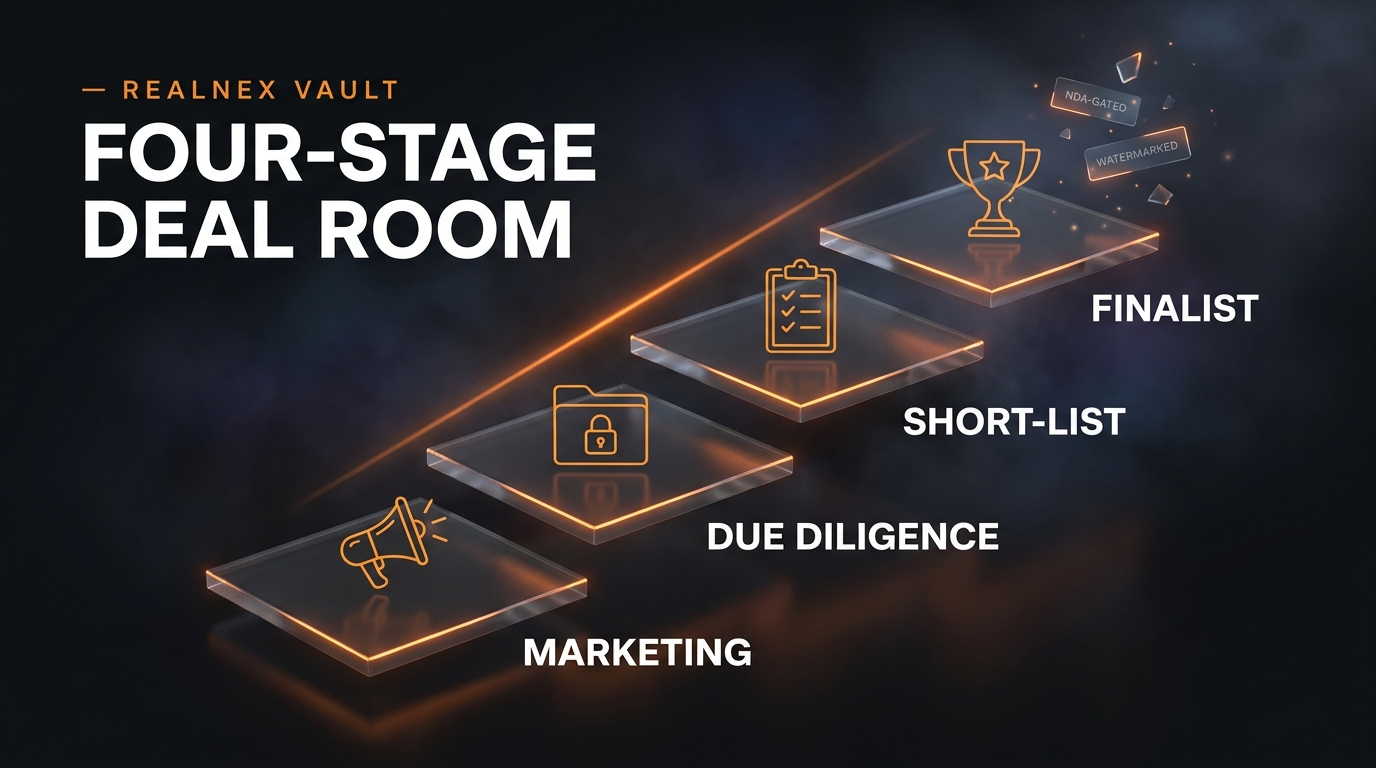
The four-stage deal progression
Marketing
Upload once, open access to qualified prospects
Due Diligence
Stage-gated documents unlock as bidders qualify
Short-List
Engagement analytics show who's seriously evaluating
Finalist
NDA-gated final materials, ready for close
Lessons
- Create the room — CRE-native stages, pre-configured folders, and broker terminology are ready out of the box.
- Upload documents once; Vault manages who sees what as the deal progresses.
- Invite unlimited external participants — buyers, investors, attorneys, lenders — always free.
- Stage-gated access — sensitive documents reach only the right participants; NDA required before release.
- Automated NDA signature walls with built-in e-signature.
- Eight tiered access levels and role-based permissions.
- Two-factor authentication and dynamic watermarking by participant role.
- Immutable audit trail — a documented, defensible record of who accessed what, when.
Per-document, per-bidder analytics show time-on-page — you can literally see who spent 18 minutes on the rent roll. That's the call you make first. Use analytics to run an informed call-for-offers and close for highest value.
Knowledge check
1. How many external participants can join a Vault deal room, and at what cost?
2. What must a bidder do before stage-gated sensitive documents are released?
3. Which subscribers get Vault included at no extra charge?
Insights — Real-Time Business Intelligence
Dynamic Power BI dashboards on your live KRM data. Zero spreadsheets.
Quick overview
One-minute overview hosted by Mark Kingston, Executive Chairman (AI-assisted production).
What Insights gives you
RealNex Insights delivers Power BI dashboards directly within the platform, drawing from live KRM data — no exports, no third-party BI configuration. Analytics operate at enterprise, team, sector, and individual levels, and Insights is included for KRM subscribers.
The four core dashboards
📁 Active & Closed Projects
Deal status, pipeline health, and commission probability — what's closing and why.
💰 Commissions
Totals and participant breakdown by organization, subsidiary, or agent role, with year-over-year trend comparison.
🧲 Leads
Pipeline velocity, aging, and conversion rates, with bottleneck detection and outcome prediction.
🏢 Properties
Market mapping by location, asset type, and value — drill down by owner, date, project type, and more.
Lessons
- Open the Active Projects dashboard for a snapshot of deals by stage and commission probability.
- Spot where the pipeline is strong or weak, and which deals are aging.
- Use conversion trends to improve forecasting accuracy and deal velocity.
- Analyze commission forecasts, probabilities, and outcomes by project, type, location, and owner.
- Compare YoY trends and agent productivity, win/loss ratios, and market performance by sqft, asset class, or submarket.
- Deliver insights to clients and leadership in seconds — no manual reporting.
Knowledge check
1. What technology powers Insights dashboards?
2. Which four core dashboards does Insights include?
Mobile App — Close Deals From the Field
Your live KRM travels with you — contacts, properties, comps, and deal activity one tap away, synced with your team in real time.
📇 On hand
Your entire KRM database from the field — client details, comps, deal status in real time.
🗓 Anywhere
Calendar, to-dos, voice-dictated notes, and automated reminders on the go.
📸 Field capture
Photos auto-geocoded to the property; build stacking plans on site.
🔔 Alerts
Real-time Bridge deal activity and MarketPlace listing updates on your phone.

Lessons
- Pull property details, comps, and the latest deal activity in seconds before any meeting.
- Voice-dictate notes straight into records right after a call or showing.
- Manage your calendar and follow-ups; automated reminders keep you on schedule.
- Update client and deal records the moment things change — your team stays aligned instantly.
- Take photos directly in the app — properties are automatically geocoded with location data.
- Build stacking plans on site.
- Your KRM property database stays current without a trip back to the office — and every record you capture in the field feeds RealNex Intelligence.
Practical notes: available on iOS and Android; data is encrypted in transit and at rest; previously loaded data is available offline and syncs when you reconnect.
Knowledge check
1. What happens when you photograph a property in the app?
2. Can you work offline?
Visuals — Bring Every Property to Life
Your complete visual media partner in CRE — integrated with the platform so every asset lives alongside your listings, marketing, and KRM data.
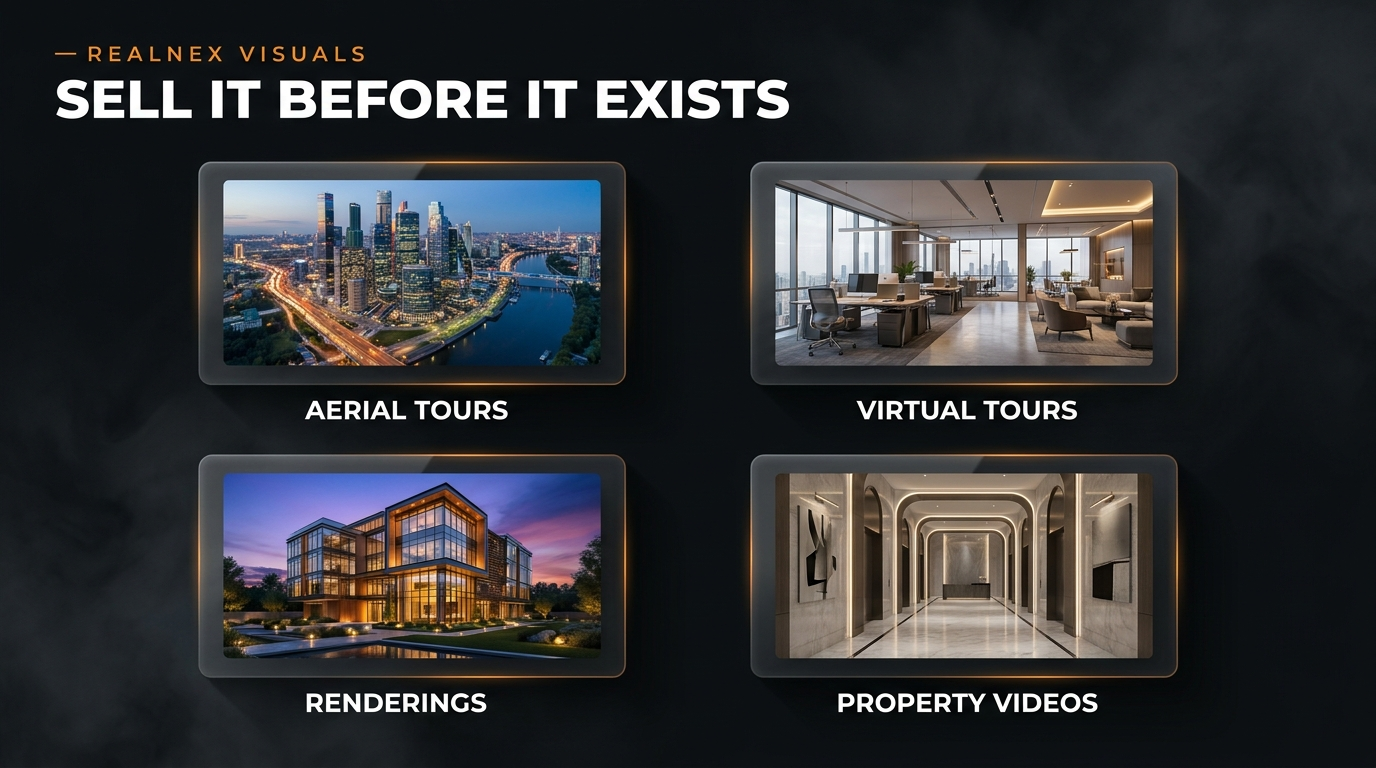
Four visual media solutions
🚁 Aerial Video Tours
Data-infused video maps combining drone footage with on-screen labels, callouts, and graphics — show exactly where the property sits and why the location matters.
🥽 Virtual Tours
Fully immersive, interactive 3D environments — prospects explore a property from any device, anywhere, before setting foot inside.
🖼 Renderings
Photorealistic stills of architecture, interiors, and finishes — showcase multiple design and material options, and sell the vision before the space exists.
🎬 Property Videos
Animated cinematic walkthroughs along a choreographed camera path with voiceover and music — built for social, email, investor decks, and listing platforms.
Lessons
- Location is the story → Aerial Video Tour: proximity, access, and surroundings with data callouts.
- Space needs to be experienced → Virtual Tour: qualify buyers, tenants, and investors faster by removing geographic and scheduling barriers.
- Property isn't built yet → Renderings and Property Videos: from a preliminary site plan and a handful of reference photos, sell the vision at concept, construction, or completed build.
- Marketing needs motion → Property Video: one asset that works across every channel.
- Accelerate marketing and sales — differentiated visuals command attention across every listing, pitch, and platform.
- Compress deal cycles — prospects who tour virtually arrive informed and ready to act.
- Reduce costs — cost-effective visuals stretch marketing dollars across every channel.
- Improve design and revisions — present multiple finish options and layouts to stakeholders in a fraction of the time.
Because Visuals is built into the platform, every asset deploys straight into MarketPlace listings, RealCampaigns, Vault deal rooms, and your website.
Knowledge check
1. Which format tells the location story with drone footage and data callouts?
2. Can visuals be created before a property is built?
RealBlast & RealCampaigns
Your list. Our network. One campaign engine.
Two tools, two audiences
📣 RealBlast — our network
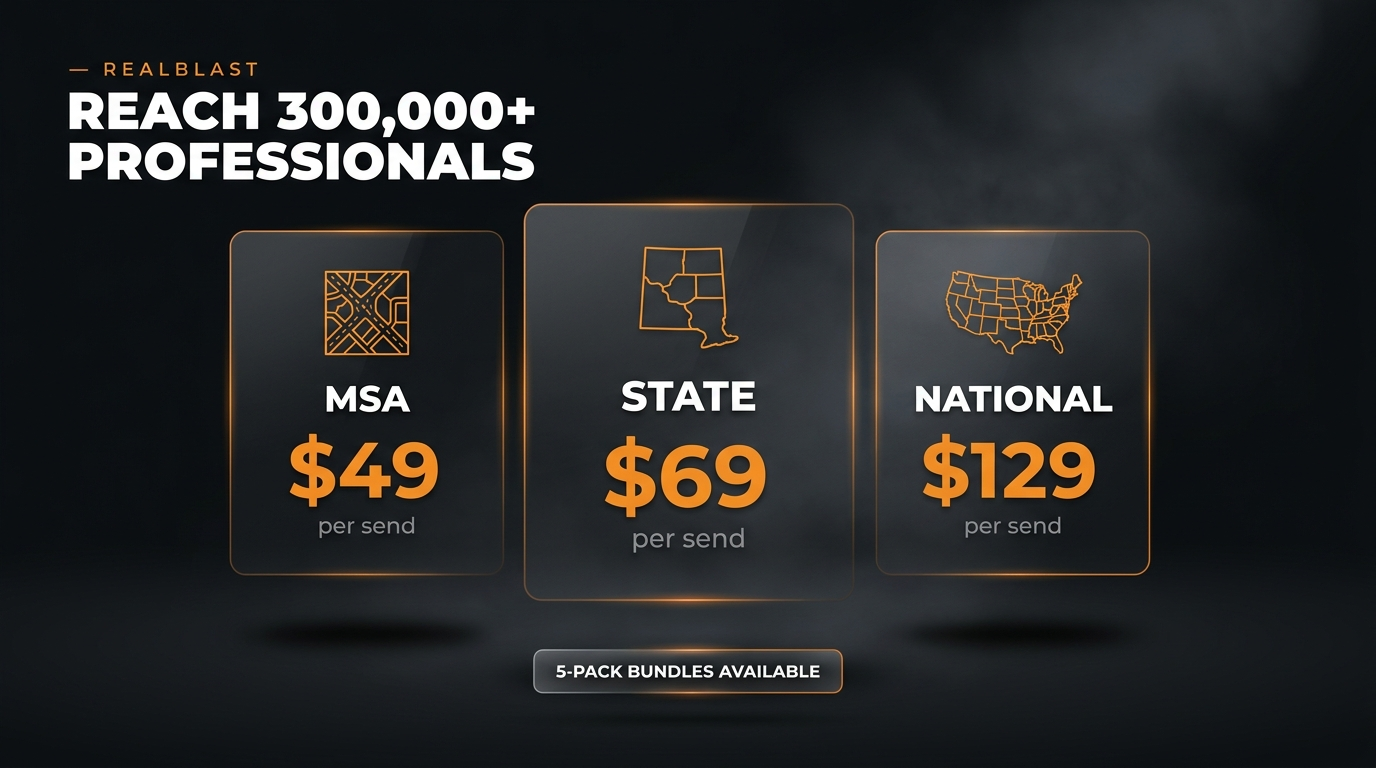
Blast your listing to 300,000+ qualified CRE professionals across the RealNex network — in seconds, not days. Target by City/MSA, State, or National.
🎯 RealCampaigns — your list
Market to the contacts you know: branded templates, CRM merge fields, targeted sends, and analytics that show exactly who to follow up with next.
Lessons
- List your property in MarketPlace — key attributes auto-extract into a complete, professional flyer.
- Customize & target — choose a branded template (or upload your own HTML/image) and pick MSA, State, or National coverage.
- Send & track — launch in seconds, monitor opens, clicks, and engagement, then follow up.
Pricing per send
| Coverage | Price | Reach |
|---|---|---|
| MSA | $49 / send | Your metro market |
| State | $69 / send | Your full state |
| National | $129 / send | The entire U.S. network |
MarketPlace subscribers get 5-pack bundle pricing for additional savings.
- Build — choose a CRE-built template or branded layout (listings, newsletters, research, service updates).
- Target — select a CRM list, group, or RealBlast audience.
- Send — launch highly targeted messages in seconds, with merge fields for names, company data, renewal dates, asset interests, and custom fields.
- Track — monitor opens, clicks, receipts, and activity.
- Follow up — prioritize the contacts showing intent.
- Property offerings — promote listings aligned to each investor's deal profile. One-click campaigns straight from MarketPlace.
- Investor updates — research, market notes, and newsletters.
- Client services — announce capabilities to owners and tenants.
- Lease renewal outreach — personalized messages timed to renewal dates from your KRM.
Embed or link property sites, videos, tours, flyers, and interactive experiences for higher-impact content.
Knowledge check
1. How large is the RealBlast network audience?
2. What's the key difference between the two tools?
3. What does a National RealBlast send cost?
MP Direct & MP Premier
Put your CRE listings to work on your own website — no duplicate entry, inventory always current.
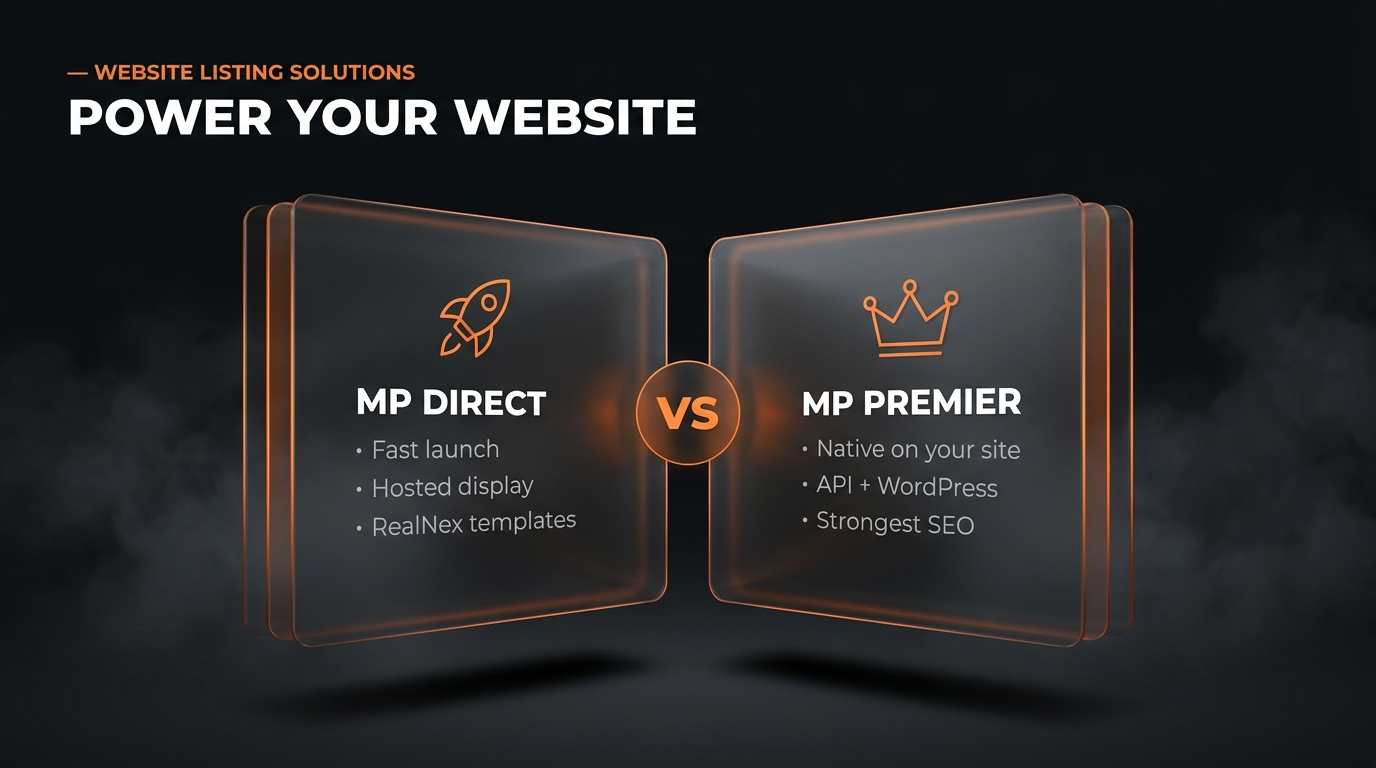
Two ways to power your site
MP Direct
Fast, professional listing display. Shows your firm's listings using RealNex templates, views, and search — maps, thumbnails, easy navigation — with no redundant manual updates. Best for a fast launch.
MP Premier
Native, branded, API-powered search. Hosts listing content directly on your site via an API-driven WordPress plugin — SEO-optimized property pages with full brand control (colors, fonts, featured listings). Best for deeper brand control and the strongest SEO.
Choosing the right fit
| What you need | MP Direct | MP Premier |
|---|---|---|
| Fast launch, polished listing search | Excellent fit | Strong fit |
| Native site hosting, deeper brand control | Limited | Ideal |
| SEO value from on-site property pages | Basic | Strongest |
Lesson
- Enter listings once in RealNex MarketPlace.
- The feed powers your website automatically — your team updates once, and inventory stays current everywhere.
- Add market context overlays: demographics, business data, and traffic patterns.
- Keep prospects engaged with your firm's properties and brand, instead of sending traffic elsewhere.
Knowledge check
1. Which option offers the strongest SEO from on-site property pages?
2. How do listings get onto your website?
RealNex Intelligence — AI for CRE
CRE-trained AI for strategy, underwriting, and marketing, built on the data already in your KRM — in partnership with CRE Marketing Hub. The more your team works the system, the sharper it gets.
Quick overview: the CRE Intelligence Advantage
One-minute overview hosted by Mark Kingston, Executive Chairman (AI-assisted production).
Why CRE-trained AI is different
Most AI platforms don't understand deal flow, tenancy, underwriting, or investor relations. CRE Marketing Hub's AI was trained on commercial real estate by industry professionals, and is available to all RealNex subscribers. As KRM integration deepens over time, each client's AI becomes increasingly informed by their own markets, deals, and institutional intelligence.
🧠 Deal Intelligence
Deal strategy, market analysis, and business development tools.
🎓 24/7 AI Coach
On-demand guidance to solve challenges, pitch listings, and work deals.
✍️ Marketing & Branding
Ready-to-use content, listing descriptions, video, and marketing plans.
📱 Social Media
Professional, ready-to-post CRE content for LinkedIn and Facebook.
Lessons
- Property profiling — get the full story behind any listing or asset class.
- Targeted & ideal-client marketing — campaigns that speak directly to your ideal clients.
- Negotiation & strategy — structure deals, respond to offers, pitch listings with precision.
- Document abstracts — summarize leases, offering memos, and investor docs in seconds.
- Ready-to-post content and a stock image library.
- Offering memorandums — polished OMs in minutes, not days.
- CRE financial calculators — run the numbers instantly to support every pitch.
Results to expect: more qualified leads, faster closes with strategic guidance, a stronger personal brand, and 10+ hours saved weekly on content creation.
- Paste a lease into the abstract tool and get a summary before your next client call.
- Generate a listing description and two LinkedIn posts for your newest MarketPlace listing.
- Ask the AI coach to help you structure a counter-offer strategy on a live deal.
- Build a 30-day marketing plan for your top farm area.
Knowledge check
1. What makes CRE Marketing Hub's AI different from generic AI tools?
2. Which document tasks can the AI handle?
Role Playbooks
End-to-end workflows for your role — with video walkthroughs.
🏦 Investment Sales Broker
Playbook: from prospecting to closed sale
- Prospect (KRM + NavigatorPRO): query owners by hold cycle, loan maturity, and buying history. Build your call list and log every touch.
- Win the listing (MarketEdge): generate a branded BOV with visual comps and instant IRR / equity multiple / cash-on-cash analysis.
- Go to market (MarketPlace + RealBlast): publish once, syndicate everywhere; blast to 300,000+ professionals; run targeted RealCampaigns to matching investors in your KRM.
- Qualify buyers (Vault): spin up a deal room in 60 seconds, gate diligence docs behind NDAs, and watch per-bidder engagement analytics to see who's serious.
- Close & compound (KRM + Insights): record the comp, track the commission, and let dashboards sharpen your next pursuit.
🏢 Leasing Agent

Playbook: from availability to signed lease
- Claim your buildings (Bridge): populate availabilities directly so market data stays current.
- Automate space delivery: matching requirements reach prospects automatically; track every inquiry.
- Stay connected to landlords: real-time alerts on inquiries, tours, proposals, and negotiations.
- Manage the funnel: track tours, RFPs, LOIs, and counters from one dashboard; keep documents in the Deal Vault through execution.
- Report with confidence (Insights): show owners pipeline health and deal velocity, instantly.
🔎 Tenant Rep
Playbook: from requirement to signature
- Search everything (Bridge): national database + live MarketPlace availabilities + your KRM in one tour workflow.
- Build the tour book: one-click branded PDF tour books in minutes.
- Put clients at the center: they rate and shortlist from a mobile portal; feedback auto-logs to your CRM.
- Compare with authority (Bridge + MarketEdge): automated comparison matrices with full financial analysis; lease-vs-budget economics side by side.
- Negotiate to close: structured RFPs, LOIs, and counters with document control through signing.
🎨 Marketing & Analysts
Playbook: one dataset, every deliverable
- Keep the source clean (KRM): one shared database with permissions — no duplicate data.
- Produce collateral (MarketEdge): 250+ templates for flyers, BOVs, OMs, and proposals — white-labeled to firm brand with the widget-based editor.
- Distribute (MarketPlace + RealCampaigns + RealBlast): syndication, targeted lists, and network blasts from one place; track engagement on all of it.
- Power the website (MP Direct / Premier): listing feed with SEO-optimized pages, brand controlled.
- Accelerate with AI (CRE Marketing Hub): listing descriptions, social posts, campaigns, and content calendars — 10+ hours saved weekly.
👔 Brokerage Leaders
Playbook: visibility and forecasting, not guesswork
- One shared database (KRM): the whole firm on one source of truth with role-based permissions — no siloed spreadsheets, and institutional knowledge that stays when people leave.
- Pipeline health (Insights): deal status, aging, and commission probability across every team, at a glance.
- Forecast with confidence: commission forecasts and YoY trends by organization, subsidiary, or agent role.
- Coach with data: agent productivity, win/loss ratios, and market performance by sqft, asset class, or submarket.
- Scale one system: onboarding new agents means one login and one workflow, not a stack of point tools.
🔬 Research Teams
Playbook: proprietary data as a defensible advantage
- Build on RX Data (KRM): 4.3M+ U.S. properties with ownership, loan details, and transaction history as your foundation.
- Enrich in the field (Mobile App): geocoded photos and stacking plans keep property data current in real time.
- Maintain the comp base: every closed deal writes comps and history back into the shared database.
- Serve the brokers (MarketEdge + Insights): visual comp sets, market mapping, and absorption trends on demand.
- Compound the edge (Intelligence): the deeper and cleaner your KRM, the sharper the AI's valuations and targeting.
🏗 Asset Managers
Playbook: proactive portfolio optimization
- Portfolio in one place (KRM): every asset with its tenants, leases, lenders, and history on connected records.
- Watch the timeline: lease expirations, renewals, and loan maturities tracked with automated reminders — act before dates become problems.
- Model scenarios (MarketEdge): rent roll forecasting lease-by-lease, plus sale-leaseback and lease-vs-buy analyses.
- Market vacancies (MarketPlace + Visuals): syndicated listings plus virtual tours and renderings that pre-lease space before it's built.
- Report performance (Insights): portfolio dashboards by location, asset type, and value for owners and investors.
Glossary & Resources
Key terms, quick answers, and where to go next.
Platform glossary
- Navigator
- The all-in-one RealNex platform uniting KRM, MarketEdge, Bridge, and MarketPlace, plus Vault, Insights, and AI tools.
- KRM (Knowledge & Relationship Management)
- RealNex's property-centric CRM — connects people, companies, properties, comps, activity, and transactions the way CRE actually works.
- NavigatorPRO™ / RX Data
- Pre-loaded market data (ownership, loans, transactions, tenants) with predictive analytics that surface likely buyers, sellers, and tenants.
- MarketEdge
- Investment/lease analysis and presentation builder — IRR, comps, rent roll forecasting, and 250+ branded templates.
- Bridge
- Transaction management for leasing agents and tenant reps: tour books, ratings, comparison matrices, RFP/LOI workflows. Formerly Transaction Manager.
- MarketPlace™
- Free global CRE listing search engine with multi-platform syndication and lead capture.
- Vault
- Purpose-built CRE virtual deal room with 4-stage bidder progression, NDA walls, watermarking, and per-bidder engagement analytics.
- Insights
- Embedded Power BI dashboards on live KRM data: projects, commissions, leads, and properties.
- RealBlast
- Listing email blast to the 300,000+ member RealNex network — targeted by MSA, state, or nationally.
- RealCampaigns
- Email campaign engine for your own CRM lists, with merge fields and engagement analytics.
- MP Direct / MP Premier
- Website listing solutions — hosted display (Direct) or native API-powered WordPress integration with SEO pages (Premier).
- RealNex Intelligence
- CRE-trained AI (in partnership with CRE Marketing Hub) that reads your KRM data to surface opportunities, sharpen valuations, and prioritize deals — plus marketing, coaching, document abstracts, OMs, and social content.
- Mobile App
- Your live KRM on iOS and Android — field capture with auto-geocoded photos, stacking plans, voice notes, and real-time deal alerts.
- Visuals
- RealNex's visual media arm: aerial video tours, immersive 3D virtual tours, photorealistic renderings, and cinematic property videos.
- PEARL
- RealNex's training resource hub, launching with the new website — home for structured product training.
- BOV
- Broker Opinion of Value — a valuation presentation used to win listings.
- OM
- Offering Memorandum — the marketing/diligence package for a property offering.
- LOI / RFP
- Letter of Intent / Request for Proposal — negotiation documents managed in Bridge.
- IRR / Equity Multiple / Cash-on-Cash
- Core investment return metrics calculated instantly in MarketEdge.
Video library
| Topic | Link |
|---|---|
| Navigator overview | Watch on YouTube |
| KRM | Watch on YouTube |
| MarketEdge | Watch on YouTube |
| Bridge | Watch on YouTube |
| MarketPlace | Watch on YouTube |
| Vault | Watch on YouTube |
| Tenant Rep walkthrough | Watch on YouTube |
| Leasing walkthrough | Watch on YouTube |
| Investment Sales walkthrough | Watch on YouTube |
| Insights | Official 2026 video embedded in the Insights module |
| CRE Marketing Hub / Intelligence | Official 2026 video embedded in the AI module |
Official resources
🌐 Website
🗓 Book a demo
📺 Webinars
📱 Mobile App
📞 Support
281-299-3161
info@realnex.com
This learning platform is an independent training resource built to help RealNex users get the most from the platform. Product names, features, and pricing referenced from RealNex materials; confirm current details at realnex.com. Not an official RealNex product.